If your computer is running slower than ever it could be because of Startup Programs using up system resources. As the name implies, Startup Programs are the programs that start automatically every time you turn on your computer. Some of these startup programs will be visible in the System Tray (lower right-hand corner of your computer). Many startup programs, particularly malicious Spyware and Adware will not be visible in the System Tray. Instead, the Startup Programs will be running in the background eating into your system memory and causing your computer to run slower. Many Startup programs are critical to running your computer – don’t disable them unless you know for sure they’re not necessary.
Here’s how I check the Startup Programs Running on my computer: Go to Start (lower left corner) Click on Run Type in msconfig Hit Enter or OK You will now see a screen called the System Configuration Utility like the picture below. You should be on the General tab so click the Startup tab to see what programs are scheduled to run at startup. If you have had your computer for quite some time and never checked on your Startup Programs before you’ll probably be shocked to see how many are running. If the programs are checked then they run at Startup.
The picture is from Big Geek Daddy’s old computer and shows which programs I have enabled and what I haven’t. Disabling Startup Programs is an easy way to speed up your computers boot time and improve overall performance so give it a try. 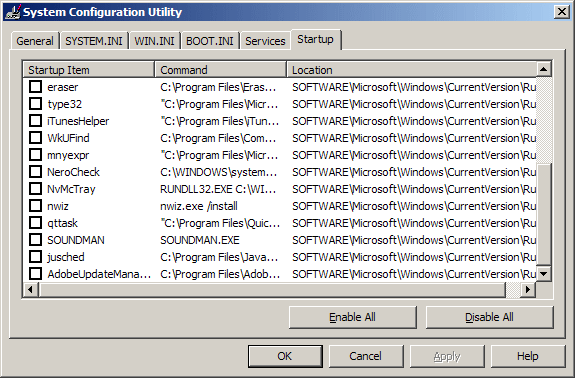 If you’re finding Spyware, Adware, Malware, or any other malicious programs in Startup my Free Virus Scan and Removal page will help you find the resources you need to remove the malware. Unchecking these malicious programs in the Startup panel probably won’t stop them from running as they’ll just enable themselves again the next time you start your computer. I suggest using Malwarebytes and running a Full Scan of your computer just to be on the safe side.
I used to recommend WinPatrol as an easy way to control startup programs but it is no longer available. Here is a list of 8 WinPatrol Alternatives that you might find helpful. starts faster.
Startup Program Lists To help determine whether a Startup Program should be enabled these are the sites I use: